Cart
Discount: 0.00 NOK
Matthijs Vader, Victron Energy |31/01, 2022
UPDATE 2022-02-16: Venus OS v2.81 to v2.84 has been released. Details in the change log on https://professional.victronenergy.com; those versions mostly contain fixes relating to v2.80 – no new features. It is recommended to update to v2.84.
CORRECTION 2022-02-16: The Bluetooth Radio in the Cerbo GX is not reliable enough to work with the Ruuvi sensors. Therefore, when installing Ruuvi sensors, we recommend to install a Bluetooth USB adapter. More information in below text, which has been updated.
—
Good day!
Today we are releasing Venus OS v2.80, a major new release full of new features and improvements.
In this blog post I’ll go through the highlights. A link to the full changelog can be found at the end of this post, as well as instructions on how to update.
For those not familiar with Venus OS: Venus OS is the software running on our Cerbo GX monitoring system< /a>, as well as its predecessors the Color Control GX, < /span>Venus GX and more. Also, it is in the GX versions of our MultiPlus-II and EasySolar-II inverter/chargers.
The main new features are:
There is much more still, the official changelog entry consists of multiple pages, as well as this blog post – lets start with the first new feature.
Something quite new, and far more popular then I anticipated to be honest: the support for the Ruuvi temperature sensors. Being powered by a small coin cell in the sensor, as well as wireless, they are super simple to install. And as such perfect to remotely keep an eye on your yacht or cabin in the winter. Or fridge or freezer temperatures, and so forth.
I have installed and am using some myself as well, and they are great. Less stress about pipes freezing up, as well as mold growing: it also reports relative humidity.
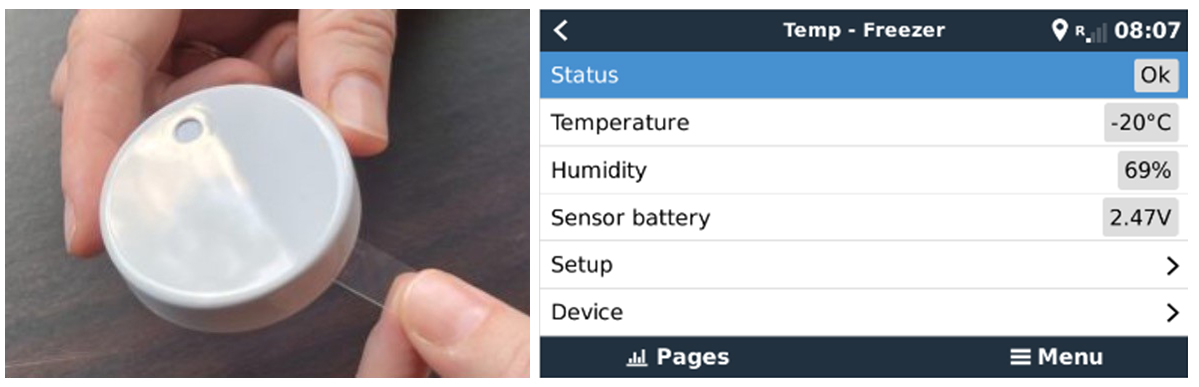
Here is a picture showing the sensor, and the reported data:

Here is how the data looks on the VRM Portal:

A few notes:
See the documentation for more details about this feature.
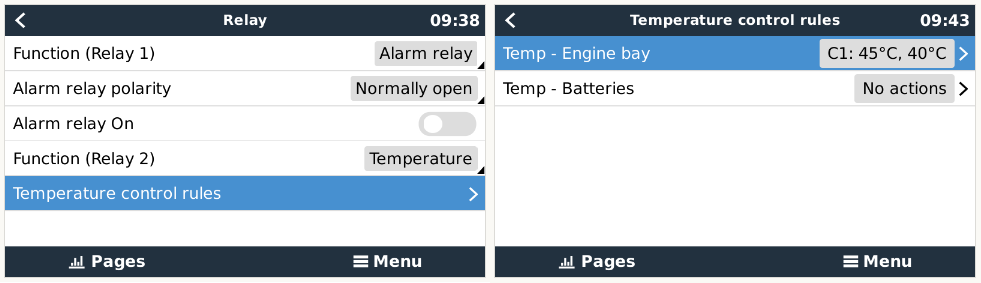
The relays on the GX device can now be controlled by temperature. For example to switch a fan, or heating pad. Here are two screenshots showing the configuration:

In the above example, the second relay will switch when the temperature in the engine bay rises above 45 degrees, starting the fan. And it will switch off once the temperature drops below 40 degrees C.
Both the first and the second relay can be configured to be controlled by temperature. And two sets of conditions can be configured, also for the same relay.
The next improvement is the ability to use the SmartShunt or BMV-712 for DC metering.
Here are a few examples of what to use it for:
When the Shunt is configured as “DC Energy Meter” (in VictronConnect), and the GX is enabled with “has DC system”, the GX does more than just recording and visualization:
Using the DC metering for anything else, not DC systems, has no effect on the system behaviour. In that case it’s just measuring and making the data available to monitor.
To use these features, use VictronConnect to configure the SmartShunt or BMV-712 to be a meter, in the Misc Settings menus.< /p>
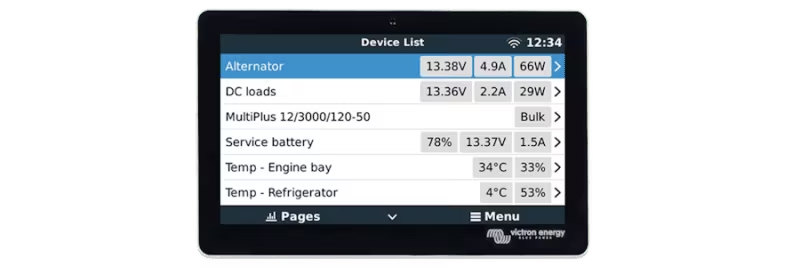
This screenshot shows an example system, a catamaran, having five shunts installed: one at the battery for state of charge, and one at each alternator, and one for the DC circuit in each of the hulls:

AC meters, such as the supported Carlo Gavazzi meters, can now be used to measure a load, or a circuit having multiple loads. Once installed, configured to a new “role”: AC Load monitor. This is done in the GX menu where you also choose between Grid, PV Inverter and Generator. With AC Load monitor selected, the load will be shown in the Device list.
Support for this new feature will also be coming to VRM shortly.
We also increased the maximum possible power value for starting a generator, it was previously 100kW, and now has been increased to 1MW.
More information has been added to generator view (running/not running, last run, why it’s running, and more) on the VRM Portal Dashboard, when enabling the Detailed view.
More detailed information about AC input (grid/shore) as well as AC Loads, including frequency has been added.
Support has been added to show output current & power on the second leg of the MultiPlus-II 2x120V. That model of inverter/charger was launched last year and aimed at the North American market – where docks and camping grounds sometimes offer a single phase supply, and sometimes a dual phase.
These screenshots show the data, in the Device list (left), Overview (right) as well as on the VRM Portal (bottom).
We have added a lock button that helps prevent accidental button presses like “Start generator” or “Multi Off”. There are several other MFD improvements to fix bugs, compatibility and additional languages – see the release notes for more specifics.
This version completes the support for the Inverter RS, including DVCC control by managed batteries, SOC sync and error codes.
It is important to note that, as announced last year, this version also removes the option to connect an Inverter RS, and Multi RS, via VE.Direct. As of 2.80 onward, it is only possible to connect these products via a VE.Can network. We apologize to those systems already in the field connected via VE.Direct, they should be left at the previous version until they can be rewired to VE.Can. The wiring options for the MPPT RS are not changed: they can be connected using either the VE.Direct or the VE.Can ports.
This is the first version of Venus OS that is compatible with the brand new Multi RS, which is now becoming available for order with very limited stock – however many significant limitations still apply. Complete support for Multi RS is expected to be completed in February or March 2022.
We are always working to make the connectivity with Victron products as simple and trouble free as possible. In this release we have:
For split- and three-phase ESS systems, with their mode configured to “Total of all phases”, the behavior has been optimized to be symmetrical. All phases are now adjusted to convert the same amount of power from, as well as to, DC.
In the past, this option primarily avoided passing power through the DC-bus to avoid inefficiency, but didn’ t take full advantage of the billing arrangement to use all the available power when there is a shortfall on another phase. Now it divides the work equally across the phases, thereby making the full inverter capacity available, and with no impact on billing.
This change will mainly benefit systems having inverters that are smaller than the maximum per phase load.
There are various small fixes and improvements, these are the highlights:
More details are in the change log
Besides the items above, there are many more changes. All rather minor and related to certain specific situations or systems. To read them, find the full change log by logging into Victron Professional  ;and selecting ‘Firmware’ -> ‘Venus Olympics’ -> ‘firmware changelog’.
Information about how to install the firmware is in the manual of your GX Device. Quick links to the relevant pages: Cerbo GX, Color Control GX and for the Venus GX.
That is it for now, sincerely yours,