
 Svenska
 Dansk
Dansk
 Suomi
Suomi
 Español
 Deutsch
 Français
 Italiano
 Nederlands
 Polskie
 Norsk
Norsk
Cart
Your cart is empty, but doesn't have to be..
Discount: 0.00 EUR
Digital Skipper |1/04, 2024
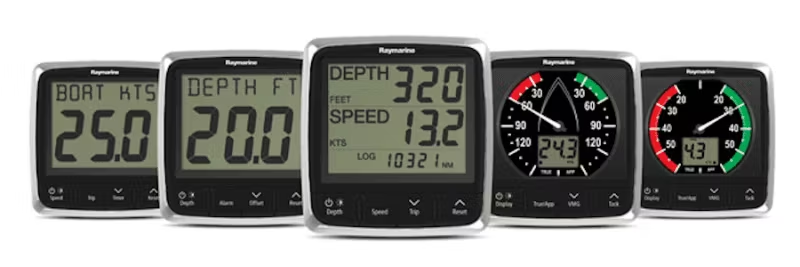
If the speed or temperature on your Raymarine instrument display (e.g., ST40, i40, ST60, ST60+, ST70, i50, i70, ITC-5) is not working correctly, it is usually due to two common causes. This guide will help you identify the problem and fix it.
Look at your speed display. For speed, does it show dashes (-.- knots) or does it show zeros (0.0 knots)?
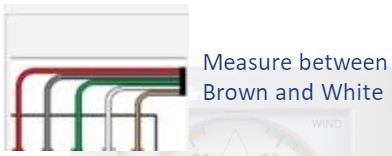
The thermistor is measured between the brown and white wires on the speed transducer. Do the following:
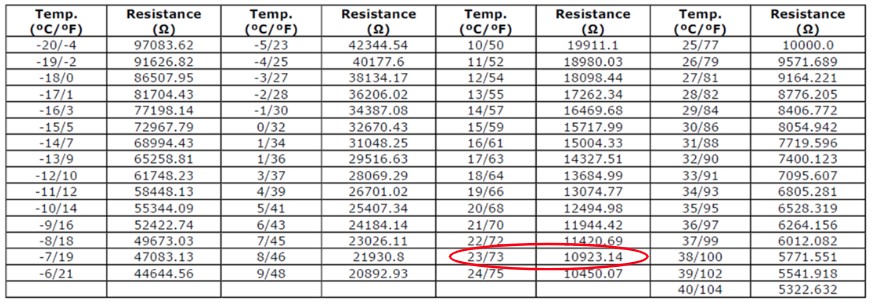
Below is a table showing approximate resistance values at different temperatures. Example: 11K ohm ≈ 23°C. If the resistance is drastically different (e.g., open circuit), the thermistor is defective.
To restore the water temperature, you must replace the transducer, as these are completely sealed and cannot be repaired.