
 Svenska
 Dansk
Dansk
 Suomi
Suomi
 Español
 Deutsch
 Français
 Italiano
 Nederlands
 Polskie
 Norsk
Norsk
Cart
Your cart is empty, but doesn't have to be..
Discount: 0.00 EUR
Matthijs Vader, Victron Energy |22/06, 2021
The development of Venus OS continues, and version 2.71 introduces several long-awaited features. In this article, we will go through the highlights. A link to the full changelog and update instructions can be found at the end of the post. For those unfamiliar with Venus OS: it is the software that runs on Cerbo GX as well as previous models such as Color Control GX and Venus GX. It is also available in the GX versions of MultiPlus-II and EasySolar-II.
Note that this version also includes changes from v2.70, which was never publicly released.
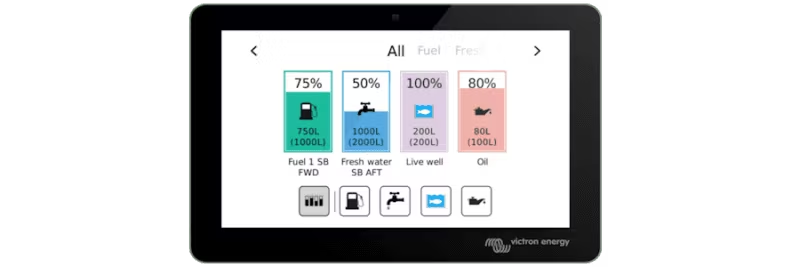
The biggest news is a new overview screen for tank levels. The function is activated via Settings → Display & Language → Show tank overview and is accessed via the carousel on GX Touch 50. The overview works with GX Tank 140 as well as Cerbo GX built-in inputs and compatible sensors.
Further improvements include configurable high and low level warnings.
Minor adjustments in menus for better intuitiveness: improved labels, error codes, firmware reporting, hidden ESS options when irrelevant, and AC-PV monitoring. A bug affecting the Marine MFD App on Garmin MFD has been fixed.
You can now factory reset a GX device by placing a special file on an SD card or USB and restarting the device. Details can be found in the manual.
The full changelog can be found on Victron Professional. Installation instructions can be found in the manuals for Cerbo GX, Color Control GX and Venus GX.